邮件模板
Logto 提供了多种用于自定义邮件内容的模板,这些模板根据使用场景进行分类。
强烈建议你在不同场景下使用不同的模板。否则,用户可能会收到与当前操作不符的邮件内容,造成困惑。如果有缺失且未配置的模板,可能会导致依赖该模板的流程出错,影响业务的正常开展。
邮件模板自定义选项
Logto 提供了三种不同的邮件模板管理方式:
-
在 Logto 内自定义模板
- 连接器 (Connectors):
- 能力 (Capabilities):
- ✅ 灵活地在模板中插入多种变量
- ✅ 通过 Management API 创建自定义多语言模板
- ✅ 在 Logto 内完全编辑模板
-
在服务商平台自定义模板
- 连接器 (Connectors):
- 能力 (Capabilities):
- ✅ 向服务商平台传递变量
- ✅ 向服务商平台传递
locale参数以实现本地化 - ✅ 在服务商控制台内完全编辑模板(使用 Logto Management API)
-
预设模板(不可自定义)
- 连接器 (Connector):
- 能力 (Capabilities):
- ✅ 原生变量支持
- ❌ 多语言模板 (即将支持)
- ❌ 禁止模板 / UI 修改
邮件模板类型
| usageType | 场景 | 变量 (Variables) |
|---|---|---|
| SignIn | 用户使用邮箱登录,通过输入验证码而非密码进行验证。 | code: string application: ApplicationInfoorganization?: OrganizationInfo |
| Register | 用户使用邮箱注册账号,并通过输入 Logto 发送到邮箱的验证码进行验证。 | code: string application: ApplicationInfoorganization?: OrganizationInfo |
| ForgotPassword | 用户在登录时忘记密码,可以选择先通过邮箱验证身份以重置密码。 | code: string application: ApplicationInfoorganization?: OrganizationInfo |
| Generic | 此模板可作为多种场景的通用备选方案,包括测试连接器配置、登录后验证或绑定邮箱等。 | code: string |
| OrganizationInvitation | 使用此模板向用户发送邀请链接,邀请其加入组织。 | link: string organization: OrganizationInfoinviter?: UserInfo |
| UserPermissionValidation | 在应用使用过程中,某些高风险操作或风险较高的操作需要额外用户验证,如银行转账、删除正在使用的资源、取消会员等。UserPermissionValidation 模板可用于定义这些场景下用户收到的邮件验证码内容。 | code: string user: UserInfoapplication?: ApplicationInfo |
| BindNewIdentifier | 用户修改个人资料时,可能为当前账号绑定邮箱地址。此时可使用 BindNewIdentifier 模板自定义验证邮件内容。 | code: string user: UserInfoapplication?: ApplicationInfo |
| MfaVerification | 启用邮箱 MFA 时,此模板用于在多因素认证 (MFA) 流程中向用户发送验证码。 | code: string application: ApplicationInfoorganization?: OrganizationInfo |
| BindMfa | 启用邮箱 MFA 时,此模板用于设置 MFA 邮箱验证码。用户在将邮箱地址作为 MFA 因子绑定或配置时会收到此验证码。 | code: string user: UserInfoapplication?: ApplicationInfo |
邮件模板变量
Code
用户需要输入的验证码,用于完成验证流程。适用于 SignIn、Register、ForgotPassword、Generic、UserPermissionValidation 和 BindNewIdentifier 模板。
- 验证码有效期为 10 分钟。目前暂不支持自定义验证码过期时间。
- 模板中需预留
{{code}}占位符。发送验证码时,会用随机生成的验证码替换该占位符后再发送邮件给用户。
ApplicationInfo
用户正在交互的客户端应用的公开信息。适用于 SignIn、Register、ForgotPassword、UserPermissionValidation 和 BindNewIdentifier 模板。
type ApplicationInfo = {
  id: string;
  name: string;
  displayName?: string;
  branding?: {
    logoUrl?: string;
    darkLogoUrl?: string;
    favicon?: string;
    darkFavicon?: string;
  };
};
- 所有嵌套的应用信息字段都可通过点语法在模板中访问。例如,
{{application.name}}会被替换为你配置的实际应用名称。 - 如果未提供根
application变量,则 handlebars 占位符会被忽略且不会被替换。 - 如果提供的
application对象不包含所需字段或值为 undefined,则 handlebars 占位符会被替换为空字符串。例如{{application.foo.bar}}会被替换为 ``。
OrganizationInfo
用户正在交互的组织的公开信息。
type OrganizationInfo = {
  id: string;
  name: string;
  branding?: {
    logoUrl?: string;
    darkLogoUrl?: string;
    favicon?: string;
    darkFavicon?: string;
  };
};
- 对于
SignIn、Register和ForgotPassword模板,organization变量为可选项。仅在授权请求中带有organization_id参数时可用。详见 组织特定品牌。 - 对于
OrganizationInvitation模板,organization变量为必填项。
UserInfo
邮件接收用户的公开信息。适用于 UserPermissionValidation、BindNewIdentifier 和 OrganizationInvitation 模板。
type UserInfo = {
  id: string;
  name?: string;
  username?: string;
  primaryEmail?: string;
  primaryPhone?: string;
  avatar?: string;
  profile?: Profile;
};
- 详见 profile 获取
Profile类型的更多信息。 user变量为UserPermissionValidation和BindNewIdentifier模板的必填项。inviter变量为OrganizationInvitation模板的可选项,仅在组织邀请请求中提供inviterId时可用。
UI Locales
在发起当前交互的 OIDC 认证请求中提供的原始 ui_locales 值。
- 类型:
string(以空格分隔的 BCP 47 语言标签列表,符合 OIDC 规范),例如:"fr-CA fr en"。 - 可用性:当当前登录交互由
ui_locales发起时存在。如果未提供,则该变量被省略。 - 典型用法:可在邮件内容或主题中包含,用于记录用户请求的 UI 语言,便于 i18n 支持或审计,例如:
Requested languages: {{uiLocales}}。
邮件模板示例
你可以使用以下邮件模板代码示例作为自定义 UI 的起点。要创建类似如下的用户界面:
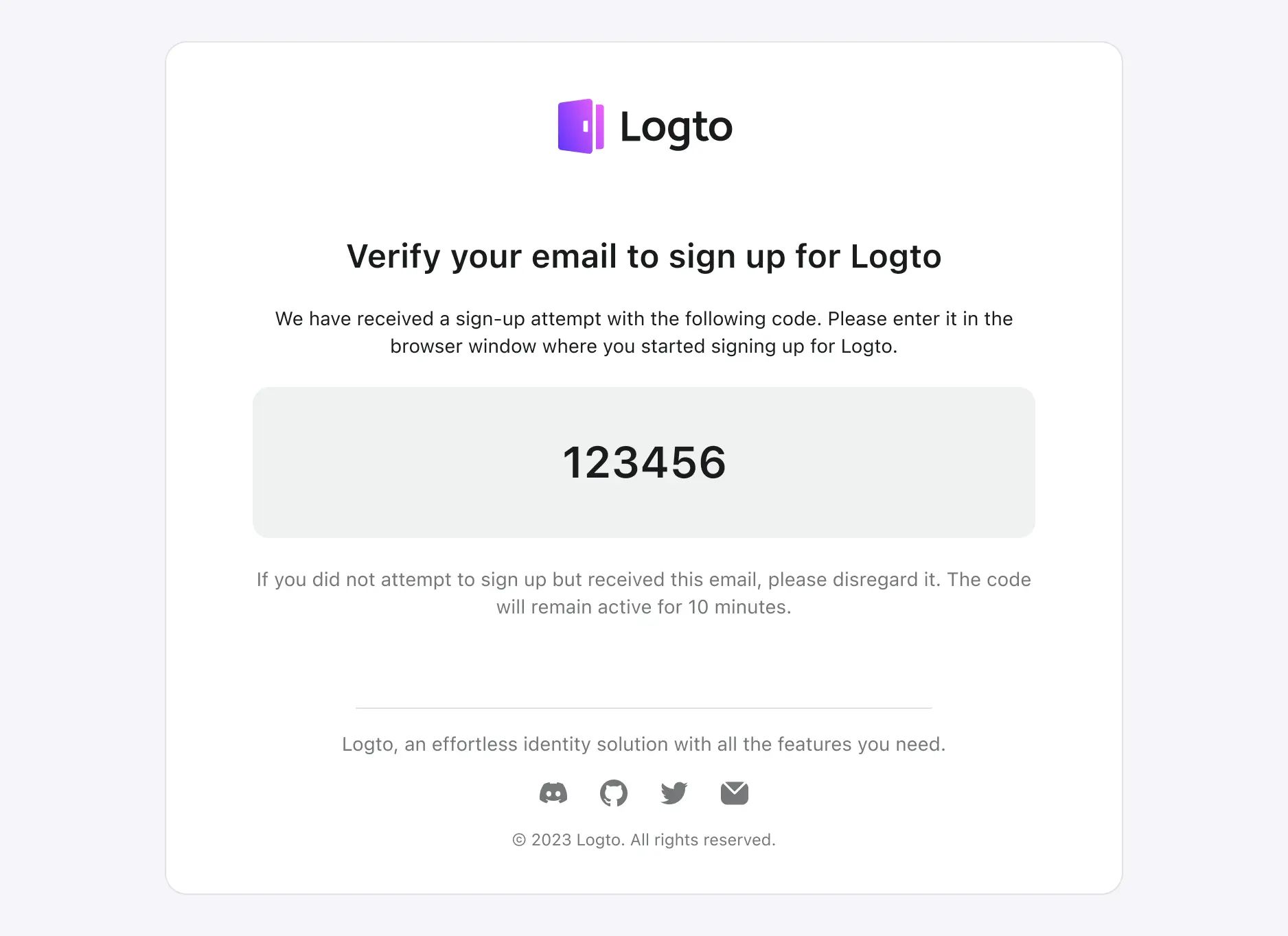
由于 Logto 不同场景下使用的邮件模板非常相似,仅在当前场景和操作描述上有所不同。
这里不详细展示所有模板的 HTML 代码,仅以登录场景为例。其他如注册、忘记密码等场景与下述示例类似。
你可以参考此模板并根据实际情况调整。
<!doctype html>
<html lang="en">
  <head>
    <meta charset="UTF-8" />
    <meta name="viewport" content="width=device-width, initial-scale=1.0" />
    <title>验证你的邮箱以登录</title>
    <style>
      .auth-service-by:hover .mini-logo {
        display: none !important;
      }
      .auth-service-by:hover .mini-logo-color {
        display: block !important;
      }
      body {
        font-family:
          'SF Pro Text',
          -apple-system,
          system-ui,
          BlinkMacSystemFont,
          'Segoe UI',
          Roboto,
          Arial,
          sans-serif;
        -webkit-font-smoothing: antialiased;
        -moz-osx-font-smoothing: grayscale;
        font-smooth: always;
        background-color: #fff;
        color: #191c1d;
        max-width: 640px;
        padding: 32px 0;
        font-size: 14px;
        font-weight: 400;
        line-height: 20px;
      }
      h1 {
        font-size: 24px;
        font-weight: 700;
        line-height: 32px;
        margin-top: 32px;
      }
      .verification-code {
        margin: 20px 0;
        background: #eff1f1;
        border-radius: 12px;
        padding: 36px;
        font-size: 32px;
        font-weight: 600;
        line-height: 40px;
      }
      .footer {
        text-align: center;
        color: #a9acac;
        margin-top: 48px;
      }
    </style>
  </head>
  <body>
    <div style="max-width: 698px; border-radius: 16px; border: 1px solid #E0E3E3;">
      <div style="padding: 0 24px;">
        <center>
          <img src="{{logoUrl}}" alt="Logo" width="auto" height="40" />
          <h1>验证你的邮箱以登录</h1>
          <p>我们已收到一次登录尝试,验证码如下。请在你打开的页面输入该验证码以完成登录流程。</p>
          <div class="verification-code">000000</div>
          <p style="color: #747778;">
            如果你并未尝试登录却收到了此邮件,请忽略。验证码将在 10 分钟内有效。
          </p>
          <hr style="margin: 64px 0 24px; max-width: 420px;" />
          <p style="color: #747778; margin: 16px 0 0;">{{companyInfo}}</p>
        </center>
      </div>
    </div>
    <div class="footer">
      <hr />
      <p style="font-size: 14px; line-height: 20px; margin: 20px 0;">
        <a href="https://logto.io" style="color: #A9ACAC; text-decoration: underline;">Logto</a>:
        为开发者打造更好的身份基础设施。
      </p>
      <table style="margin: 0 auto; width: auto; border-spacing: 0;">
        <tbody>
          <tr>
            <td style="vertical-align: middle;">
              <a href="{{discordServerUrl}}" style="display: block; margin: 0 12px;">
                <img src="{{discordLogoUrl}}" style="width: 20px;" />
              </a>
            </td>
            <td style="vertical-align: middle;">
              <a href="{{githubUrl}}" style="display: block; margin: 0 12px;">
                <img src="{{githubLogoUrl}}" style="width: 20px;" />
              </a>
            </td>
            <td style="vertical-align: middle;">
              <a href="{{twitterUrl}}" style="display: block; margin: 0 12px;">
                <img src="{{twitterLogoUrl}}" style="width: 20px;" />
              </a>
            </td>
            <td style="vertical-align: middle;">
              <a href="{{mailToUrl}}" style="display: block; margin: 0 12px;">
                <img src="{{emailIconUrl}}" style="width: 20px;" />
              </a>
            </td>
          </tr>
        </tbody>
      </table>
      <p style="font-size: 12px; line-height: 16px;">
        © Silverhand, Inc., 2810 North Church Street, Wilmington, DE 19802
      </p>
      <p style="color: #A9ACAC; font-size: 12px; line-height: 16px;">
        有问题或需要帮助?
        <a href="{{mailToUrl}}" style="color: #A9ACAC; text-decoration: underline;">联系我们</a>
      </p>
    </div>
  </body>
</html>
你可以将上述 HTML 代码进行转义后,添加到配置中的连接器 "Template" 字段,例如(以 SendGrid 连接器为例):
{
  "subject": "<sign-in-template-subject>",
  "content": "<table cellpadding=\"0\" cellspacing=\"0\" ...",
  "usageType": "SignIn",
  "type": "text/html"
}
邮件模板本地化
针对不同语言自定义邮件模板
Logto 支持通过 Management API 为不同语言创建自定义邮件模板。你可以为不同语言和模板类型创建自定义邮件模板,为用户提供本地化体验。
type EmailTemplate = {
  languageTag: string;
  templateType: TemplateType;
  details: {
    subject: string;
    content: string;
    contentType?: 'text/html' | 'text/plain';
    replyTo?: string;
    sendFrom?: string;
  };
};
| 字段 (Field) | 描述 (Description) |
|---|---|
| subject | 邮件主题模板。 |
| content | 邮件内容模板。 |
| contentType | 某些邮件服务商可能会根据内容类型渲染邮件模板(如 Sendgrid、Mailgun)。可通过此字段指定邮件模板的内容类型。 |
| replyTo | 接收邮件回复的邮箱地址。请咨询你的邮件服务商是否支持此字段。 |
| sendFrom | 邮件发送者的名称别名。请咨询你的邮件服务商是否支持此字段。 |
创建邮件模板后,Logto 会自动优先根据用户的语言偏好选择合适的邮件模板。
语言偏好解析顺序如下:
- 如果 OIDC 认证请求包含
ui_locales,Logto 会选择ui_locales中第一个被租户语言库支持的标签。详见 ui_locales。 - 否则,对于客户端 体验 API 和 用户账号 API,Logto 使用
Accept-Language头。对于 Management API(如 组织邀请),你可以在messagePayload的locale字段中指定语言。 - 如果都未提供,Logto 会回退到登录体验中配置的租户默认语言。详见 本地化语言 配置。
模板选择:
- 根据解析出的语言,Logto 会查找
languageTag和templateType匹配的自定义邮件模板。如有,则使用该模板。 - 如果没有匹配的自定义模板,则使用连接器配置中的默认邮件模板。
支持的邮件连接器 (Supported email connectors):
服务商侧邮件模板本地化
对于使用由服务商管理邮件模板的邮件连接器的开发者:
用户的首选语言会通过模板 payload 中的 locale 参数传递给服务商。你可以在服务商控制台为不同语言创建多个模板,并通过 locale 参数指定语言偏好。
当认证请求中存在 ui_locales 时,模板上下文中会同时提供 locale 和 uiLocales 变量。
uiLocales 变量包含认证请求中的原始 ui_locales 值,而 locale 变量则是根据 ui_locales 解析出的第一个支持标签。如果未提供 ui_locales,locale 会遵循标准解析规则(如 Accept-Language,再到默认语言)。
常见问题 (FAQs)
如果未在 Logto 配置模板,如何使用第三方邮件模板服务?
你可以在自己的 Web 服务中添加一个新接口用于发送邮件,然后使用 Logto HTTP 邮件连接器 调用你维护的接口。
这样你就可以在自己的服务器上处理邮件模板逻辑。
是否可以用 Logto 邮件向用户发送自定义的“欢迎邮件”?
我们提供了 Webhook 功能。你可以实现自己的 API 接口以接收 Logto Webhook 发送的 User.Created 事件,并在 webhook 处理器中添加发送自定义欢迎邮件的逻辑。
Logto 邮件连接器仅为认证 (Authentication) 流程相关事件提供邮件通知。欢迎邮件属于业务需求,邮件连接器原生不支持,但可通过 Webhook 实现该功能。
相关资源
最大化验证码邮件送达率,保障用户访问